There is a gap between the AI tool you like and the systems your work actually lives in. You can ask Claude a sharp question about a customer, and it has no idea who that customer is, what they pay you, or what they emailed last Tuesday.
The General Input MCP closes that gap. Connect your workspace once, and Claude, ChatGPT, Gemini, or Grok can reach every integration you have authorized, every workflow and skill you have built, and the business context sitting behind them.
Connectors cover the popular actions. That is the problem.
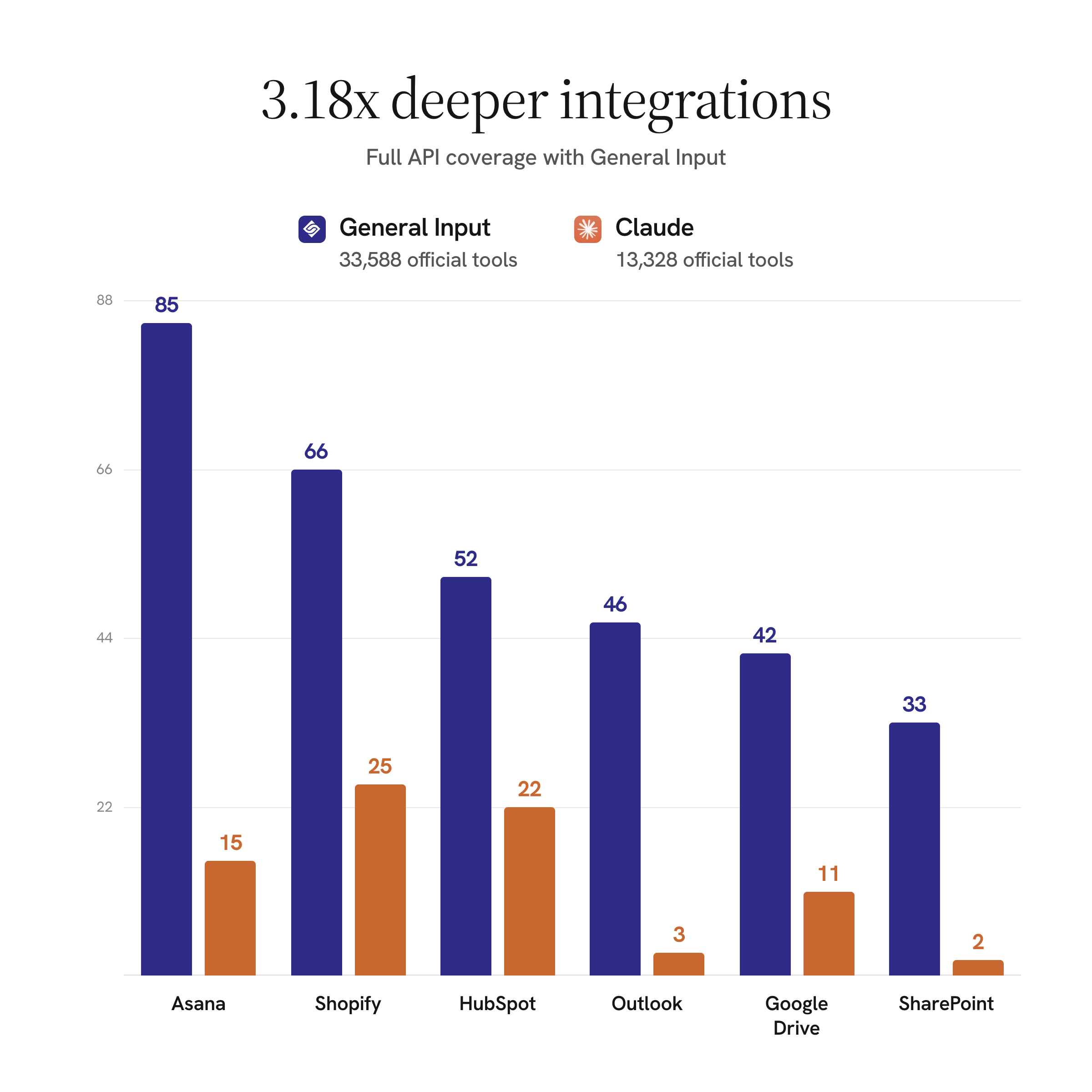
We measured this before building it. Across the services that appear in both catalogs, a General Input integration carries a median of 35 tools where the equivalent Anthropic-verified connector carries 11. Same vendor, same public API, roughly three times the reach.
The gap is wider than the median suggests on the systems people actually run their week in. Outlook is 46 operations against 3; SharePoint is 33 against 2.
This is not a knock on the people building those connectors. It is a constraint they are working inside. Every tool definition an MCP client loads gets injected into the model's context window before the conversation starts, so shipping the whole API means spending someone's context budget on endpoints they may never call. The rational move is to ship the top ten actions.
General Input takes the other route. Operation docs load on demand and calls execute as code, so nothing occupies context until the agent actually reaches for it. That is why the catalog can be deep without being expensive, and it happens to be the pattern Anthropic's own engineering team now recommends.
What you can do once it is connected
The connector is not a read-only window onto your data. It exposes the same agent toolset that runs inside General Input, which means from the chat window you can:
- Search and call any operation across your connected integrations
- Build and run workflows, and read their execution traces
- Create skills, then reuse them in later sessions
- Reach the context graph, so the agent knows what your business is and who your customers are
- Write results back into the workspace instead of leaving them in a chat log
A worked example: the QBR nobody wants to build
Quarterly business reviews are a good test because the work is not the thinking, it is the assembly. CSMs commonly report spending eight to twelve hours putting one together, and the reason is that the numbers live in five systems that do not talk to each other.
In the video above, the ask is one sentence: build a QBR deck for this client, and find what you need in General Input. The agent goes and gets account activity, the history of what was discussed, open issues, and commercial context, then Claude Design lays it out as a deck.
The interesting part comes after. Once the deck exists, you can tell the agent to save the process:
Now that you understand how to create this deck, please create a skill in General Input with the template and process for this information.
It writes that skill back into your workspace. The next QBR is not another twelve-hour assembly job, it is a repeat of a process your business now owns.
Setting it up
Open Settings, find MCP, and copy the connector name and server URL. In Claude, go to Connectors, choose Add custom connector, paste both, and authenticate. That pairs the workspace to your account.
The same server URL works anywhere that speaks MCP. Settings has copy-paste steps for Claude on web and desktop, ChatGPT desktop, Claude Code, and Codex CLI.
Bring your own intelligence
We have been building toward this for a while. Bring your own subscription lets you run automations on the ChatGPT, Claude, Gemini, and Grok subscriptions you pay for. The MCP is the other direction: instead of bringing your model to our product, it brings your business to whichever AI tool you already have open.
You should not have to pick a chat window based on which one can see your CRM. Pick the model you like, and connect it to the systems your business actually runs on.